Pope Phoenix: Merancang set kartu remi yang terinspirasi hip-hop di Affinity
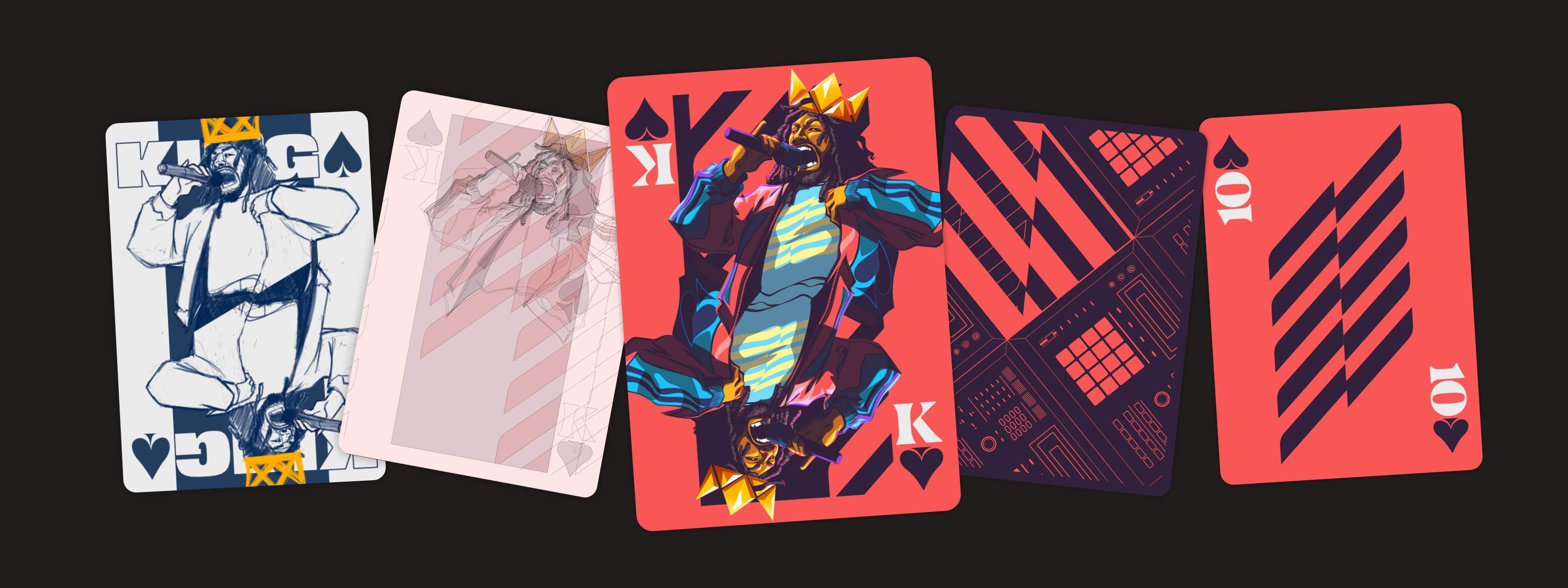
Kartu remi selalu membuat saya terpesona sebagai sebuah sistem desain. Setiap simbol, karakter, dan pilihan tata letak harus berfungsi secara mandiri, namun tetap terasa terintegrasi sebagai bagian dari satu set kartu yang utuh. Jadi, ketika Affinity meminta saya untuk merancang set kartu remi versi saya sendiri, saya melihatnya sebagai kesempatan untuk mengeksplorasi keseimbangan antara bentuk dan fungsi. Berikut penjelasan tentang cara saya mengembangkan tema untuk set kartu tersebut dan membuat desain royal flush di Affinity.
Langkah 1: Pengembangan ide dan riset
Setelah menjajaki beberapa arah yang berbeda, saya akhirnya mempersempit pilihan tema menjadi Afrofuturisme, budaya Hip-hop, dan kerajaan Wakanda. Sejak awal, kami merasa bahwa kartu bergambar akan memberi saya kesempatan terbaik untuk memamerkan karya ilustrasi saya, yang kemudian menginspirasi konsep royal flush dengan empat pilar Hip-hop: MCing, DJing, Breaking/B-boying, dan Grafiti.
Setiap kartu bergambar mewakili satu pilar, bersama dengan satu kartu angka 10. Secara keseluruhan, proyek ini akan mencakup empat kartu bergambar, satu kartu angka, dan desain bagian belakang yang disesuaikan.
Dari situ, saya mulai mengumpulkan referensi untuk lebih memahami struktur dan bahasa visual dari setumpuk kartu remi tradisional, serta kerangka kerja yang harus saya ikuti. Anda dapat melihat papan inspirasi lengkapnya di sini, di Pinterest.
Langkah 2: Thumbnail dan sketsa kasar
King of Spades terasa sebagai nama yang tepat untuk proyek ini, dan setelah konsep visual utamanya ditetapkan—yaitu menerjemahkan empat pilar Hip-hop ke dalam struktur royal flush—saya mulai menggambar sketsa berbagai ide sambil memikirkan apa yang menentukan keberhasial desain kartu remi.
Menurut saya, salah satu tantangan terbesar adalah memasukkan unsur simbolisme dan referensi budaya tanpa terjebak dalam stereotip genre itu.
Beberapa konsep awal lebih condong ke arah editorial dan lebih mirip sampul majalah daripada kartu yang bisa dimainkan. Awalnya saya tertarik menggunakan pendekatan ala majalah, tetapi semakin saya mengembangkannya, semakin jelas bahwa desain harus mengutamakan fungsi. Karena itu, saya terpaksa mengesampingkan ide tersebut. Dengan menggunakan format kartu remi tradisional, ilustrasi dalam proyek ini dapat berfungsi dengan baik sesuai tujuannya, sambil tetap memberi saya kebebasan untuk memperkuat identitas visual masing-masing karakter. Desain kartu bergambar dua arah memastikan informasi pada kartu tetap terlihat jelas dari kedua arah, baik saat dipegang maupun saat dimainkan.
Pada akhirnya, memilih tata letak kartu tradisional yang dapat dibaca dari kedua arah terbukti memperkuat kualitas keseluruhan set kartu ini dibandingkan menggunakan komposisi yang lebih eksperimental. Batasan itu tidak membatasi, melainkan membantu memperjelas arah pengerjaan. Dengan demikian, setiap ilustrasi, pose, dan elemen grafis harus bekerja secara terpadu dalam satu sistem desain, bukan hanya menjadi gambar-gambar individual.
Ketika mulai merancang karakter untuk setiap pilar, saya mengalami kesulitan mencari referensi dengan sudut wajah dan pose tubuh yang sesuai untuk format kartu remi. Perancang poster film Drew Struzan dikenal sering menjadikan dirinya sendiri sebagai model referensi, lalu menambahkan wajah karakter atau tokoh yang dibutuhkan pada ilustrasinya. Meskipun pernah menggunakan teknik serupa sebelumnya, kali ini saya memilih untuk menggabungkan beberapa referensi berbeda untuk menyusun komposisi yang lebih sesuai dengan kebutuhan format desain. Pose-pose kolase tersebut selanjutnya dijadikan acuan utama dalam beberapa tahap pengembangan sketsa guna memperhalus desain setiap karakter.
Setiap pose perlu mencerminkan karakter dan energi khas dari pilar yang diwakilinya, sekaligus bekerja dengan baik dalam komposisi kartu dua arah. Proses ini menjadi sangat penting terutama saat mengembangkan kartu DJ dan Grafiti.
Langkah 3: Menyempurnakan sketsa dan mengubahnya menjadi vektor di Affinity
Ilustrasi utama awalnya berupa sketsa kasar di buku, sebelum kemudian dipindahkan ke Affinity untuk disempurnakan lebih lanjut menggunakan kuas pensil raster. Pada tahap ini, saya bekerja seperti saat menggunakan buku sketsa konvensional: sering menghapus dan menggambar ulang, bukan mengandalkan fitur-fitur digital seperti transform tool atau cloning.
Bagi saya, sketsa yang sudah disempurnakan ini hanyalah titik awal. Ilustrasi akan terus berubah dan berkembang seiring berjalannya proses desain. Ketika terlalu lama berkutat dengan sebuah ilustrasi, kesalahan yang terlihat jelas bagi orang lain sering kali justru luput dari perhatian kita. Itulah mengapa sikap fleksibel dan siap melakukan revisi sangat penting dalam proses penyempurnaan desain.
Salah satu tantangan terbesar adalah menyesuaikan ilustrasi agar tetap efektif dalam format kartu yang dapat dibaca dari kedua arah. Dalam proses pembuatan setiap kartu, saya selalu mempertimbangkan bagaimana bentuk, pose, dan detail visual akan saling terhubung setelah diterapkan dalam komposisi kartu dua arah. Konsep dan eksekusi hampir tidak pernah sepenuhnya selaras dengan apa yang dibayangkan sejak awal. Oleh sebab itu, setiap ilustrasi mengalami berbagai penyesuaian selama proses pengembangan.
Sebagian revisi cukup dilakukan dengan mengubah node, tetapi ada juga yang mengharuskan saya membuat salinan ilustrasi lengkap dalam bentuk garis luar. Versi tersebut kemudian dipadukan dengan masker kliping dan mode Hapus untuk mengontrol hubungan antarbagian ilustrasi. Setelah fondasi sistemnya siap, proses menyederhanakan dan merapikan tampilan karya menjadi lebih mudah, tanpa mengorbankan cerita dan makna yang ingin disampaikan melalui masing-masing kartu.
Bekerja menggunakan Affinity membuat proses ini jauh lebih lancar karena alat vektor dan raster sudah terintegrasi langsung di dalam aplikasi. Saya bisa membuat sketsa, menyempurnakan, dan menyesuaikan ide secara spontan tanpa perlu berpindah-pindah antara buku sketsa, kamera, dan berbagai aplikasi desain terpisah. Berkat fleksibilitas ini, alur kerja menjadi jauh lebih efisien dan eksplorasi ide dapat dilakukan dengan lebih leluasa sepanjang pengerjaan proyek.
Langkah 4: Mewarnai
Saya ingin warna terasa berani, cerah, dan penuh energi, sama seperti cara saya memandang Hip-hop.
Palet warna mulai terbentuk saat saya mengerjakan kartu King. Seiring berjalannya proses pada kartu-kartu berikutnya, pilihan warnanya semakin kuat dan mantap. Di tengah palet terdapat warna merah pekat dengan tingkat kecerahan sedang. Jika dilihat sendiri, warnanya tampak kusam, tetapi menjadi cerah saat dipadukan dengan warna lain, yaitu ungu pekat yang dramatis. Keduanya menjadi inti dari proyek warna King of Spades.
Warna-warna tersebut dipadukan dengan dua warna sekunder, yaitu kuning kusam dan biru cerah. Light electric blue digunakan sebagai aksen, serta warna putih gading untuk tipografi dan detail grafis.
Secara keseluruhan, palet warna ini menciptakan kontras visual yang mencolok di seluruh set kartu. Warna merah pada sisi depan kartu membantu menghidupkan ilustrasi beserta energinya. Bagian belakang yang berwarna ungu tua menghadirkan nuansa yang lebih gelap sebagai penyeimbang, dengan detail grafis yang dibingkai garis merah.
Dalam hal pewarnaan, saya menggunakan prinsip yang sama seperti yang saya terapkan pada ilustrasi tradisional. Linework saya anggap sebagai gambar tinta yang sudah final, sementara warna-warnanya saya susun dalam kelompok terpisah di lapisan bawah. Mungkin ini proses yang lebih lambat daripada yang biasanya disarankan orang, tetapi tetap menjadi cara kerja yang paling saya sukai.
Langkah 5: Membuat bagian depan kartu As, Raja, Ratu, dan Jack
Begitu ilustrasi utama selesai dikerjakan, saya mulai menyempurnakan keseluruhan sistem dengan memastikan setiap elemen selaras satu sama lain, sambil memperbaiki tata letak dan detail yang masih perlu disesuaikan.
Pada proyek serupa berikutnya, saya akan membuat sistem template dinamis sejak awal dengan menjadikan tata letak final sebagai Simbol. Dengan demikian, setiap revisi pada tata letak akan otomatis diterapkan ke semua variasi desain yang ada di seluruh proyek.
Langkah 6: Menambahkan detail yang digambar tangan
Dengan adanya akses ke alat vektor dan raster di dalam Affinity, saya dapat membuat judul "Jack" langsung dari sketsa, tidak hanya typeface dari perusahaan pengembang huruf. Pada masa awal budaya hip-hop di tahun '70-an dan '80-an, banyak selebaran dibuat dengan tulisan tangan. Itulah sebabnya saya memilih membuat tipografi khusus untuk kartu Grafiti, karena pendekatan tersebut terasa lebih autentik dan mencerminkan akar dari bentuk seni yang diangkat.
Untuk memberikan karakter yang lebih kuat pada lettering, saya mengubah salah satu spidol Tombow dengan menggores ujungnya menggunakan silet sehingga menghasilkan sapuan yang lebih kasar dan ekspresif, terinspirasi gaya James Victore. Setelah itu, saya mulai bereksperimen di buku sketsa.
Setelah menghasilkan banyak sketsa dan eksperimen di atas kertas, saya memotretnya, memasukkannya ke Affinity, memanfaatkan fitur Jejak Gambar, kemudian mengembangkan dan menyempurnakan konsep-konsep terbaik.
Teknik-teknik tradisional menawarkan tekstur yang lebih organik dan hasil yang tidak sepenuhnya dapat diprediksi, sehingga mampu memberikan kesan hidup pada ilustrasi digital, terutama jika disandingkan dengan ketepatan dan kerapian karya vektor.
Untuk kartu Jack, hal yang paling penting adalah merepresentasikan energi dan karakter grafiti yang ekspresif serta penuh spontanitas dengan cara yang autentik. Setelah desainnya selesai, saya merasa perlu sentuhan akhir agar tampilannya terlihat lebih utuh. Karena karakter cat semprot memang cenderung acak dan sulit dikendalikan, saya perlu melakukan banyak eksperimen terlebih dahulu sebelum menemukan kumpulan kuas yang sesuai dari True Grit Texture Supply dan koleksi kuas standar Affinity untuk menciptakan efek yang dibutuhkan. Untuk mendapatkan tampilan yang tepat, saya perlu melalui proses eksperimen dengan mencampur berbagai kuas, mengatur lapisannya, dan memodifikasi sapuan yang ada. Dengan cara itulah saya bisa menghasilkan efek percikan, semprotan, dan tetesan cat yang meyakinkan.
Langkah 7: Membuat angka 10 dan bagian belakang kartu
Tahap terakhir adalah mencari cara untuk menyatukan secara visual seluruh set kartu, termasuk kartu angka dan desain bagian belakang. Kartu angka tersebut mengalami beberapa kali perubahan selama proyek berlangsung. Desain kartu ini sempat menggunakan pola titik sederhana, kemudian beralih ke grafis yang terinspirasi oleh garis bass. Meski begitu, saya sengaja menghindari simbol-simbol klise seperti mikrofon raksasa atau piringan vinyl. Meski elemen tersebut sering diasosiasikan dengan hip-hop, saya berusaha menghindari penggunaan ikon-ikon yang terlalu klise.
Pada akhirnya, pilihan saya jatuh pada visual equalizer yang telah distilisasi untuk kartu angka, sementara bagian belakang kartu mengusung desain yang terinspirasi dari MPC. Keduanya adalah bagian penting dan ikonik dari budaya hip-hop, tetapi tidak termasuk simbol-simbol yang paling sering digunakan sebagai referensi. Equalizer merepresentasikan dinamika dan irama, sedangkan MPC adalah salah satu perangkat modern yang telah menjadi bagian penting dalam produksi musik Hip-hop.
Proses mendesain sisi belakang kartu membutuhkan banyak eksperimen dan revisi, karena saya ingin daya tarik visualnya setara dengan kartu bergambar wajah. Saya akhirnya menemukan solusi dengan menjadikan grafis MPC sebagai pola berulang. Elemen-elemen di dalamnya diputar dan dibalik pada berbagai sudut, sementara beberapa bagian desain sengaja dibiarkan keluar dari batas masker kliping di sisi belakang kartu.
Menurut saya, penting untuk tetap menyertakan elemen grafis angka pada bagian belakang kartu, namun dengan cara yang tidak membuat bentuknya terlalu dominan dalam komposisi. Dengan bantuan Pangkas Vektor, saya merapikan bentuk itu menjadi versi yang lebih sederhana dan esensial, kemudian menempatkannya di antara grafis MPC agar menyatu dengan komposisi yang sudah ada. Hasilnya adalah tambahan warna yang lebih berenergi, sekaligus memperkuat keterhubungan visual antara semua kartu dalam set tersebut.
Kesimpulan: Membangun sistem desain kartu remi yang terpadu
Bekerja menggunakan Affinity memudahkan saya untuk membuat dan menyempurnakan set kartu sebagai sebuah sistem yang utuh, bukan sekadar kumpulan ilustrasi terpisah. Kemudahan berpindah antara sketsa, desain vektor, tipografi, dan pengerjaan tekstur dalam satu ruang kerja membuat proses kreatif mengalir lebih alami, sehingga ide dapat berkembang dari rancangan kasar menjadi karya final tanpa hambatan.
Bagi saya, keberhasilan proyek ini terwujud ketika setiap kartu mampu tampil kuat secara individual, sekaligus menjadi bagian dari sistem visual yang terpadu melalui perpaduan komposisi, tipografi, simbolisme, dan warna.
Jika suatu saat saya memperluas proyek ini, prioritas saya adalah menjaga keseimbangan, ritme, dan bahasa visual yang telah terbentuk, sehingga setiap penambahan tetap selaras dengan karakter keseluruhan set kartu.


