Flujo de trabajo de Christi du Toit en Affinity: del concepto a la ilustración final
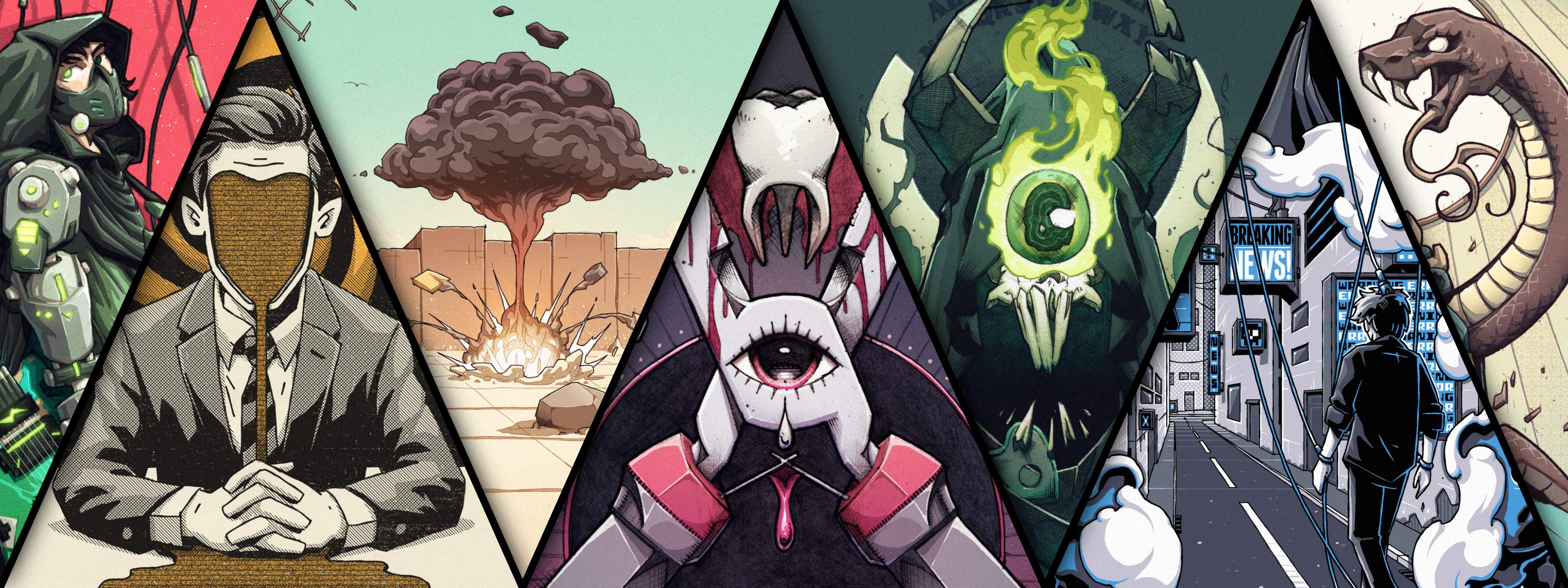
Christi du Toit, conocido por crear ilustraciones muy detalladas en las que combina personajes dibujados a mano con precisión digital, ha desarrollado un estilo propio marcado por los cómics, el diseño gráfico y sus años de experiencia como ilustrador profesional.
En esta entrevista, nos habla de las influencias en su trabajo, de cómo estudiar diseño gráfico cambió su forma de entender la ilustración y de cómo aborda un proyecto, desde el primer boceto hasta el resultado final en Affinity.
La influencia del diseño gráfico en el proceso de ilustración de Christi
A pesar de que Christi siempre supo que quería ser ilustrador, siguió un camino un poco diferente para alcanzar su meta.
“El dibujo nunca supuso un gran un obstáculo para mí de joven”, dice. “Lo difícil fue aprender toda la teoría creativa y los aspectos técnicos y digitales”.
En su época de estudiante, los cursos específicos de ilustración no estaban tan extendidos como hoy en día, así que se matriculó en Diseño Gráfico. Esa decisión acabó marcando su carrera y su forma de enfocar la comunicación visual.
“No me arrepiento de haber estudiado diseño gráfico”, afirma. “Cambió por completo mi forma de ver mi trabajo”.
Esa formación más amplia le enseñó a pensar en la ilustración como parte de un sistema visual más global: cómo funciona una ilustración en la etiqueta de un producto, en la portada de un libro o en un envase, y no solo como una imagen aislada.
Cómo desarrollar un estilo de dibujo a mano
Al preguntarle por su estilo visual, Christi lo resume así: “Digital, pero dibujado a mano. Esa es la esencia”.
Mientras otros ilustradores apuestan por una estética muy pulida, a Christi le atraen los trabajos que transmiten una sensación táctil y conservan las cualidades visuales de las herramientas tradicionales.
“No tengo ningún problema con los trabajos que tienen un aspecto y un estilo muy digital, pero siempre me ha costado sentirme satisfecho cuando los he creado yo mismo”, confiesa. “Me encanta la estética cruda y cargada de tinta de los cómics, los colores vivos de los dibujos animados y los libros infantiles y la paleta de colores limitada de las camisetas de grupos y los carteles de conciertos serigrafiados. Creo que mi trabajo se sitúa en algún punto intermedio de todo eso”.
Esas influencias siguen marcando su trabajo actual. Lo mismo ocurre con el software que usa. “Dada mi forma de trabajar, la herramienta digital principal que utilizo, y que siempre he utilizado, es el pincel. Pero, desde que uso Affinity, estoy mucho más abierto a adoptar nuevos enfoques y herramientas, como los vectores y la edición fotográfica. Affinity hace que esas cosas parezcan mucho menos intimidantes. Puedo hacerlo todo sin tener que cambiar de ventana y, mucho menos, de aplicación”.
El flujo de trabajo de Christi en la ilustración digital
Aunque cada encargo es diferente, la estructura básica del proceso de Christi se mantiene constante. A continuación describimos cómo se crea una ilustración típica, desde el primer boceto hasta la entrega del archivo final.
Fase 1: Desarrollo del concepto y planificación
Christi explica: “Cada ilustración empieza con la investigación y la resolución del problema”.
El proceso comienza con unos bocetos iniciales sobre conceptos que podrían funcionar bien. Normalmente, estos bocetos son garabatos sueltos en un cuaderno que luego se retocan digitalmente y se presentan con una breve explicación de las decisiones creativas que hay detrás de cada uno.
Trabajar de esta manera le permite desarrollar ideas con libertad, sin encariñarse demasiado pronto con ellas ni dedicar tiempo a pulir conceptos que quizá nunca lleguen a cuajar.
Para él, esta es la fase más importante del proceso, ya que todas las decisiones posteriores dependen de lo bien que se haya transmitido el concepto central.
Fase 2: Creación de un boceto digital detallado
Una vez obtenida la aprobación, Christi crea un boceto digital más detallado en Affinity. Para ello, utiliza una tableta gráfica y un pincel digital configurado para imitar la textura y el trazo de un lápiz de grafito tradicional.
En esta fase, combina diferentes herramientas para sentar unas bases sólidas para la obra final. “A menudo diseño mis composiciones con guías vectoriales y luego paso a pinceles de rasterización para crear el dibujo propiamente dicho”, explica.
Intenta que sus bocetos se acerquen lo máximo posible al resultado final, de modo que la mayoría de las decisiones creativas importantes queden resueltas antes de empezar el renderizado. Esta forma de trabajar refleja los hábitos que adquirió en el diseño gráfico: resolver los problemas pronto y luego centrarse en la ejecución.
Fase 3: Entintado y arte lineal en Affinity
Cuando todos los bocetos y la planificación están listos, pasa a la fase del arte lineal o “entintado”. Como trabaja principalmente con formatos rasterizados, crea el material gráfico a un tamaño entre 1,5 y 2 veces mayor que el de la impresión final, para conservar los detalles y que los bordes queden nítidos al reducir la escala.
Aunque le encantan los pinceles con textura y de estilo pictórico, para trabajos como la serigrafía necesita algo más sólido y controlado. Como las capas de tinta son limitadas, utiliza el sombreado y los detalles de las líneas para crear el movimiento y la profundidad que, de otro modo, aportaría el color.
Las pequeñas mejoras del flujo de trabajo también son importantes en esta fase. “He creado atajos personalizados para girar el lienzo poco a poco, lo que me ayuda a dibujar detalles finos, como el sombreado, con mayor precisión”, dice Christi.
Fase 4: Añadir color y valor
Normalmente, aborda el color y el valor en dos fases distintas, pero, cuando trabaja con una paleta limitada, adecuada para la serigrafía, ambos aspectos están estrechamente relacionados. A menudo, un solo color debe cumplir varias funciones, ya que sirve tanto de color de base como para crear profundidad o sombreado.
Para rellenar grandes áreas de color plano, Christi utiliza la herramienta Selección a mano alzada de Affinity en lugar de utilizar pinceles. Le parece más rápido y preciso, ya que ayuda a mantener los bordes nítidos y las separaciones de color limpias para la producción impresa.
Recomienda desactivar el suavizado al aplicar el color de base. “Cuando añado un color de base, desactivo el suavizado en las herramientas de selección para poder rellenar bloques de color sin dejar huecos ni crear bordes dentados”, explica.
La serigrafía también requiere una organización cuidadosa de las capas. Christi utiliza una capa para cada color de tinta y las ordena de más claro a más oscuro. De este modo, imita la secuencia de impresión y facilita el trabajo a los impresores o colaboradores.
Cuanto más complejo es el material gráfico, más importante es mantener el orden. “Me encanta usar la tecla Tab para desplazarme rápidamente por la pila de capas, renombrarlas y evitar que mis archivos se conviertan en un caos a medida que avanza el proyecto”, explica.
Fase 5: Preparación de los archivos para la impresión y la entrega
Una vez terminado el material gráfico, se lo presenta al cliente con mockups y las principales fases del proceso para poner en contexto las decisiones creativas. Tras obtener la aprobación, prepara y exporta los archivos finales: archivos sin capas para uso digital, archivos con capas correctamente estructurados para la impresión y los formatos adicionales especificados en el encargo.
Consejos para ilustradores que se pasan a Affinity
Tras años de organizar su flujo de trabajo en torno a Affinity, Christi sabe muy bien qué es lo que ayuda a los nuevos usuarios a sacarle el máximo partido.
“Affinity es un mundo aparte. Sin duda, puede sustituir a otros programas que realizan tareas similares, pero creo que ofrece mucho más. La combinación de herramientas vectoriales, de píxeles y de maquetación, junto con las posibilidades de personalización, te permite tener todo lo que necesitas al alcance de la mano en una sola aplicación, independientemente del tipo de trabajo que estés realizando”.
Según Christi, para aprovechar esa flexibilidad, lo primero es configurar el software para que se adapte a tu forma de trabajar.
Su primera recomendación es que te familiarices con la interfaz antes de hacer nada más. “Tómate tu tiempo para crear tu configuración ideal y aprovecha los métodos abreviados con los que ya estás familiarizado. Así te sentirás cómodo en muy poco tiempo”. Affinity te permite crear un estudio personalizado con las herramientas dispuestas exactamente como tú quieras. Cuando lo tengas todo configurado a tu gusto, podrás centrarte de lleno en el trabajo.
Su segundo consejo tiene que ver con el compromiso frente a la curiosidad. “Trabaja en un proyecto real de principio a fin en Affinity. Tómate las posibles dificultades iniciales como parte del proceso de aprendizaje”.
Probar funciones sueltas rara vez muestra todo el potencial del software. Las ventajas reales del flujo de trabajo solo se aprecian cuando llevas a cabo un proyecto de principio a fin. Así fue como le ocurrió a Christi. “Cuando terminé ese primer proyecto, supe que se convertiría en mi herramienta principal”.
Descubre más trabajos de Christi
Desde los primeros bocetos hasta la entrega final, el proceso de Christi se basa en un mismo principio: primero definir bien la idea y luego llevarla a cabo con éxito. Este enfoque le ha permitido desarrollar un estilo visual propio sin renunciar a la flexibilidad necesaria para adaptarse a una amplia variedad de proyectos comerciales.
Para descubrir más sobre el trabajo de Christi y conocer mejor su enfoque creativo, visita su perfil en Spotlight. También puedes descargar una selección de pinceles y recursos de ilustración personalizados, inspirados en su flujo de trabajo, para utilizarlos en tus propios proyectos.


