What’s New in Affinity: From Brand System to creative connectors
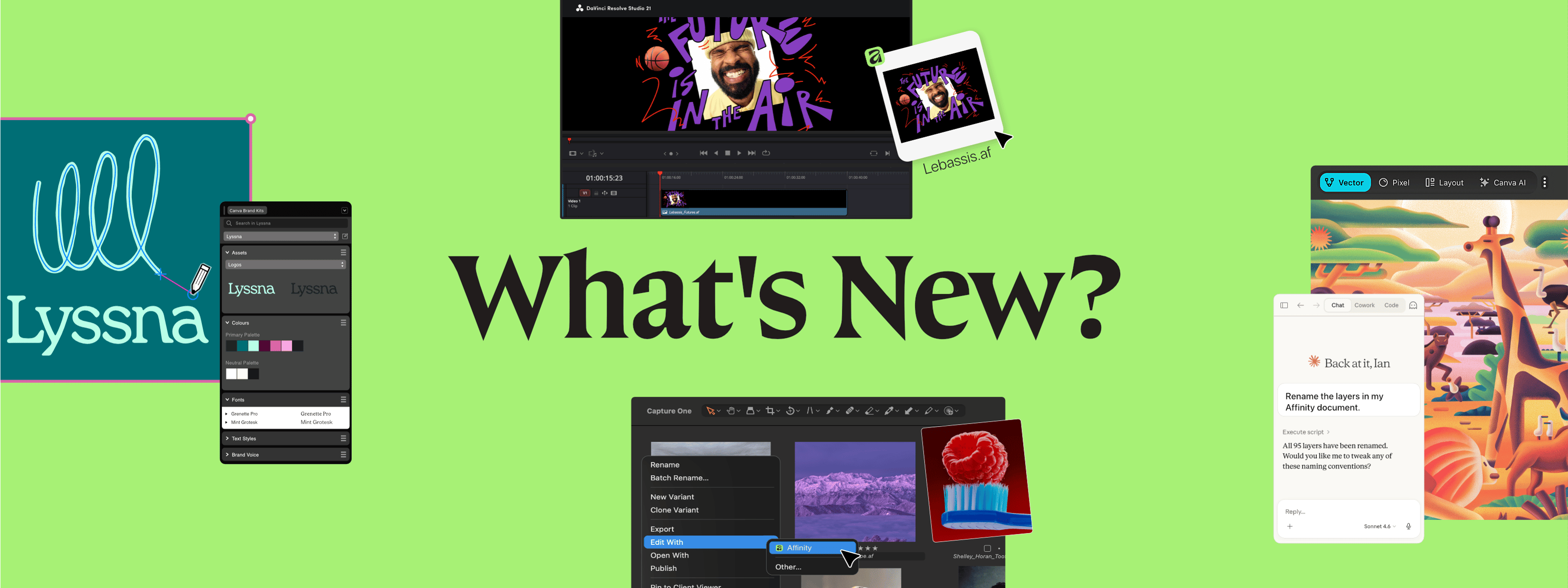
Creative work doesn’t stand still, and neither does Affinity.
We’re constantly listening to how people are working, what’s getting in the way, and what needs to change. It’s those insights that have shaped this latest build, which we’ve just shared at Canva Create 2026.
From brand consistency, to connecting your tools, to cutting down the repetitive work that slows you down, here’s what’s new.
A home for every professional brand
One of the biggest frustrations we hear from designers is brand consistency getting lost along the way. Designing on-brand across teams should be simple.
With Canva Brand System now inside Affinity, it is. You can craft with precision and stay on brand by tapping into approved colors, fonts, imagery, and brand voice right where you’re already creating.
You can then move assets seamlessly into Canva to collaborate and distribute work across teams, formats, and channels. Within Canva, those assets can live inside structured Brand Kits and controlled templates, helping keep everything consistent at scale without compromising the original craft.
No stretched logos. No color drift. No second-guessing.
All your pro tools. One creative home.
Creative work rarely happens in one place. Photographers, designers, and video editors are constantly moving between tools, each one built for a different part of the process.
The problem is, they don’t always speak the same language. That friction doesn’t just slow things down, it breaks the flow of the work.
It’s something we’ve heard a lot from the community, so we’re working to bring your tools closer together, connecting more of your workflow without the usual workarounds.
Move from Capture One to Affinity in one click
Thanks to Capture One’s new .af file support, you can open your files directly in Affinity for advanced editing and retouching. With a single click, your full edit carries through, including layers, masks, metadata, annotations, overlays, guides, and more.
No rebuilding or cleanup needed.
Just a direct path from image selection and organization into detailed retouching and compositing, with everything exactly where you expect it.
Design in Affinity, keep it moving in DaVinci Resolve
DaVinci Resolve now supports native Affinity .af files, so your designs drop straight into professional video editing without the usual file gymnastics.
And it doesn’t stop there.
When you update and save the .af file in Affinity, DaVinci Resolve refreshes it automatically, so your timeline stays in sync. No re-export. No relinking. So you can keep iterating without breaking your flow. Everything stays live, and nothing gets lost along the way.
Bringing AI-powered automation to creatives everywhere
For all the craft that goes into professional work, too much time still gets eaten up by the production tasks around it.
It’s something we’ve been hearing more and more from professionals, so we set out to change that.
With the new Affinity AI connection for Claude, you can automate those repetitive steps and keep your focus where it should be, on the work itself.
Describe a process once, and Claude builds a reusable script, ready to run whenever you need it. From batch editing to print prep, workflows run in the background while you keep creating. So instead of repeating the same steps, you can move faster and stay in flow.
You can even build entirely new tools and workflows that didn’t exist in Affinity before.
Affinity's AI Connector for Claude is free during the beta period while we continue to develop and expand its capabilities. Get started here.
Another big update from Canva: Cavalry is now free
Motion has become a core part of modern design, and we’re excited to share that Cavalry is now available for free with your Canva account, bringing motion and 2D animation into your creative toolkit.
You can now work across photo editing, vector design, layout, and motion, with one Canva account. So you can move from deep craft work through to collaboration and delivery at scale, without missing a step.
Explore everything announced at Canva Create 2026 here.
Plus more to explore
Alongside everything we’ve just covered, you’ll find even more refinements shaped directly by your feedback.
To see everything included in this release, head to the full release notes.
Ready when you are
These features are available now and ready to use in your next project.
If you’re new to Affinity, you can download it for free and experience a creative workflow built without compromise.


