Deeper RAW control and faster corrections in Affinity
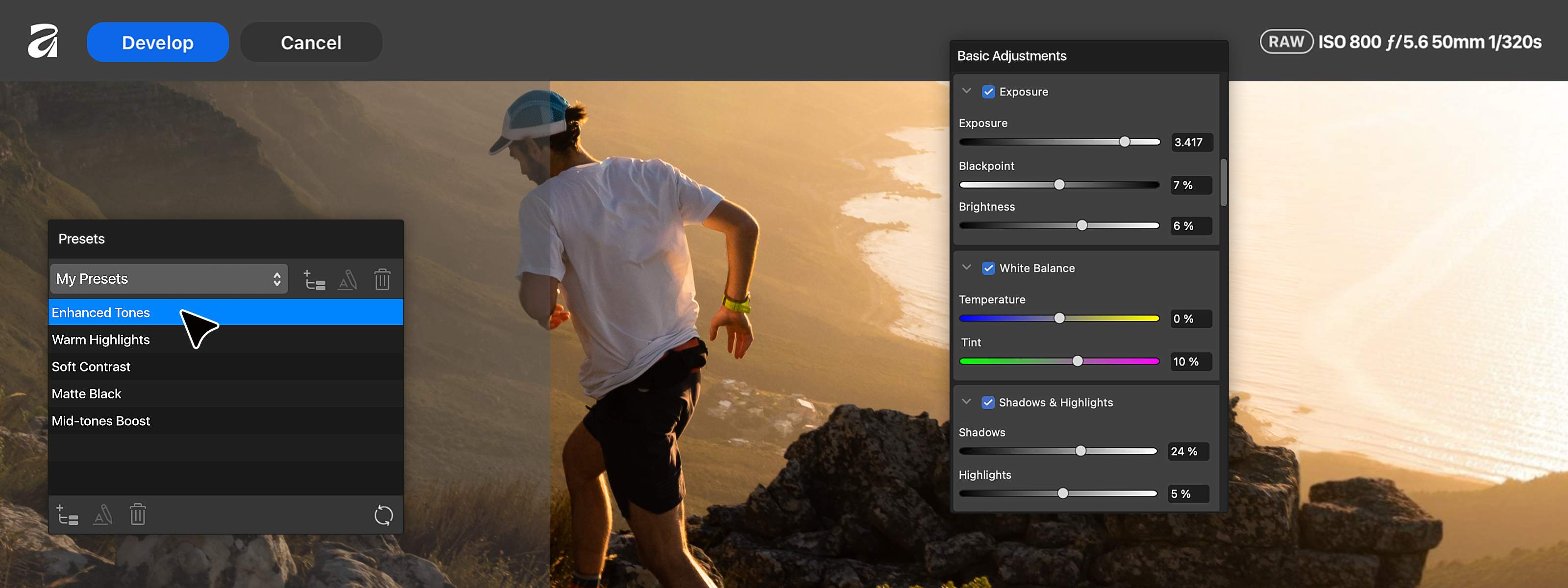
Photographers: you’ve been asking, we’ve been listening. And now our biggest ever photo editing update is here.
You’ve been telling us where you want more control, where the fiddly work gets in the way, and where your photography workflow could go further. We’ve been following the feedback, from community conversations to our beta program, and working closely with our Designer Advisory Board along the way.
Now, more of what you’ve been asking for is here. Go deeper with RAW while the data is still live, build presets you can apply across an entire shoot, and let Affinity take care of time-consuming corrections like mixed lighting and camera shake.
There’s more to get your hands on too, including nine new color, sharpening and detail adjustments, plus Scene Decomposition for turning flattened assets you might have abandoned or rebuilt into something you can rework and reimagine.
More of the control you want. Less of the manual work you don’t. All in the same Affinity app that handles your design and layout work too.
Some RAWther useful developments
Photographers shoot RAW because it gives them more to work with. And the more you can do while that RAW data is still live, the more room you have to shape the finished image.
Affinity now gives photographers much deeper control while developing RAW photos thanks to nine new color, sharpening, and detail adjustments, plus the ability to save a complete edit as one reusable preset.
The same preset can then be applied to panoramas, stacks and focus merges too, keeping the treatment consistent without another round of editing afterwards.
Build the look once. Fine-tune it until it’s yours. Then put it to work across the rest of the shoot.
Mixed Light Correction: Make light work of mixed lighting
Warm lamp, cool window, one photo... One white balance setting isn’t going to fix both.
Correcting mixed lighting usually means selecting each differently lit area and adjusting the color separately. Mixed Light Correction takes that work off your hands. Affinity can now automatically detect and balance different light sources in a photo, making it easy to correct colors without fiddly, manual selection.
Now, you can spend less time correcting the lighting conditions you were given and more time deciding how you actually want the image to look.
Scene Decomposition: Old assets, new tricks
Sometimes the image you need to work with is the one you can’t properly edit. The original file is gone. The campaign asset is flattened. And what should be a quick change suddenly means rebuilding half of it from scratch.
Scene Decomposition brings that flattened image back to life. It separates the image into editable elements directly inside your document, filling in what sat behind them as it goes. So assets you would’ve had to abandon or rebuild from scratch become something you can rework and reimagine, not just recover.
Motion Blur Reduction Tool: Move into focus
Everything about the shot works: the timing, the composition, the expression. Then you zoom in and spot the camera shake.
Motion Blur Reduction Tool gives that shot another chance, reducing motion blur and camera shake to recover sharp detail that might otherwise have been lost.
The moment doesn’t happen twice. A little camera shake doesn’t have to mean losing it.
More depth where you want it, less work where you don’t
These new photography features give you more control where your eye matters and faster ways through the work around it.
Build a look and carry it across a shoot. Fix mixed lighting without fiddly manual selection. Rescue the shot camera shake nearly cost you. Bring a flattened image back to life and start working with it again.
More time refining. Less time recovering, repeating, and fixing.
AI that respects your craft
We've only brought in the AI that earns its place. Many of these tools correct what the camera couldn't, like mixed lighting, camera shake, high-ISO noise.
And most of this release is free to use, including all your core photo, vector and layout tools. To use AI, the Canva AI Studio is unlocked with a Canva premium plan, and you can see its full list of features here.
Other new features to check out
With over 60 new features and improvements packed into this release, there’s plenty more to discover. Dive into Blend Tool and more features built for creative control, or explore new ways to cut repetitive production work.
Want the full list? Head to the release notes.


